Behind the design: Adobe Illustrator Turntable
Shaping feature design through simplicity and artist insight

Taniya Vij, Senior Staff Designer for Adobe Illustrator, put it plainly: “One of the most common things we’ve heard over the years from brand and character artists is how painstaking it is to redraw characters and artifacts from multiple viewing angles.”
The Illustrator team saw an opportunity for generative AI to ease that burden, but they wanted to do it with restraint. Rather than asking artists to adapt to new mental models or workflows, the goal was to design a feature that would fit naturally into the way artists approach their craft. Turntable, sneaked to the creative community at Adobe MAX LA in 2024, took that problem off the artist's plate by ensuring the work that went into the first drawing didn't have to be repeated, it could just be extended.
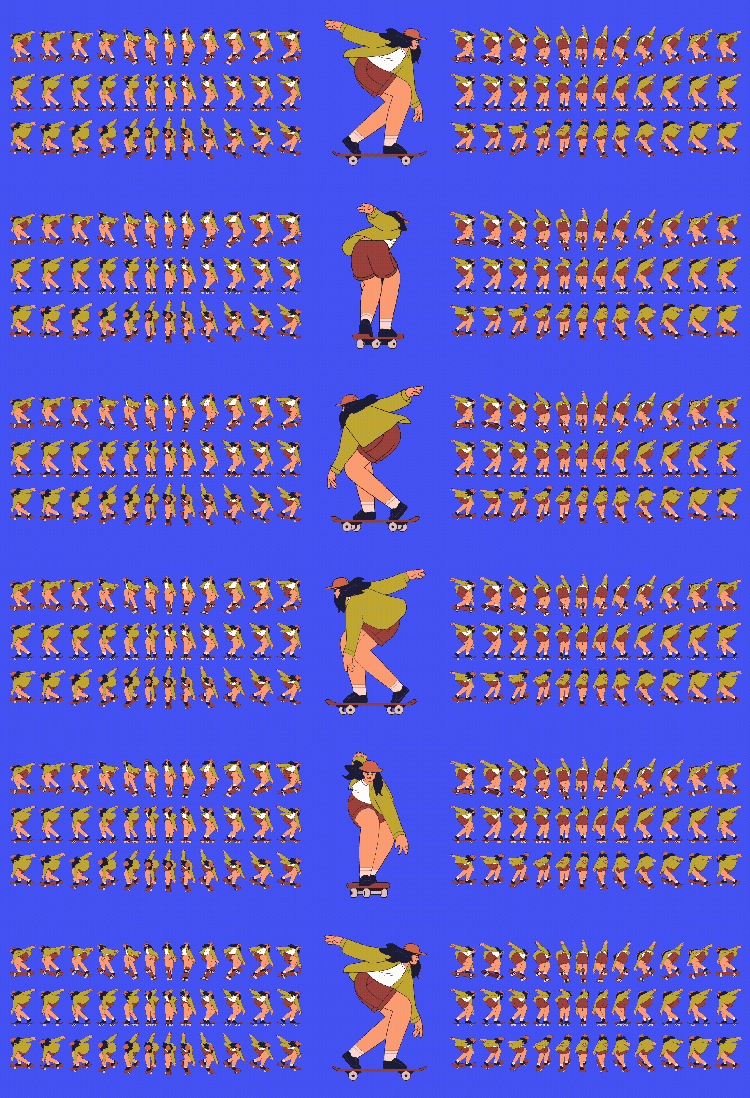
The response was overwhelming. One year later, it became a feature. Now available in Illustrator 30.3, Turntable generates front, side, and rear views of 2D artwork with a single action—keeping the focus on creative intent, not creative implementation.
What was the primary goal when you set out to design Turntable?
Taniya Vij: Turnaround models, and character sprite sheets are useful tools for maintaining consistency as artists draw their characters in different poses and from different angles for animation, mascot branding, and character design. It allows them to view their work in different rotational views while keeping the editable details, appearance, style, and structural form of their original art.
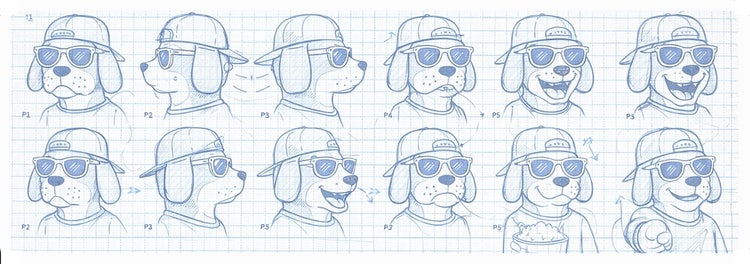
When we sneaked Turntable at MAX, there was a strong indication that people saw its value and were excited by the possibility of AI making their work easier: Most generative AI tools ask artists to translate visual intent into words. Artists describe what they want in the form of a prompt, the model interprets that language, and the result may or may not align with what was imagined. That “translation,” from text to visuals, is where friction often appears.
Turntable works differently. The artwork becomes the prompt—visual input that guides the model. No language in, no language out, just the artwork, understood and extended. The visual choices already embedded in the art are what Turntable reads to generate new views. That insight, “the artwork is the prompt,” shaped every design decision that followed. It’s why the interface could stay simple, with no prompt field, no settings panel, and no added complexity. The artist had already done the work; Turntable just needed to honor it.
What user insights did you leverage to help inform the design solution?
Taniya: As soon as we started to build this feature, we began sharing it with users and collecting and collating feedback about what was and wasn’t working and making determinations about what we could change and what we couldn’t. That process unfolded across five phases, each resulting in a new beta build.
Phase 1. Investigation and observation
We began by validating the technology, but equally important was finding where it fit within real creative workflows. Across 100 interviews, we studied character designers, 3D artists, and graphic designers—watching and listening as they moved through their daily work, collecting detailed notes on their processes, habits, and needs.
- Tech evaluation: Assessing the quality of the generative output against users’ expectations (users were able to rotate the input art up to 120° linearly, and in 45° up-and-down tilt views).
- Use case validation: Understanding which types of art were most predictably generating great results, as well as those that were lacking.
- Rudimentary controls: Testing early access patterns to understand how people instinctively wanted to interact with them.
This phase led to the creation of a Delightful Viable feature scope instead of the usual Minimal Viable version.
Phase 2. Releasing the beta into the wild
This was the transition between the private and first public beta. While engineering was working on tech scalability across different types of artwork, the design team was working on Turntable's relationship to Illustrator's other transform controls (Scale, Skew, Rotate) and how to interpret those controls for a feature that generated 3D art from software built around 2D vector art. This update included:
- Widening the funnel: Opening the beta to all subscribed Illustrator users so we could stress-test our decisions across a wider range of art.
- Quality improvement: Continuing to refine the model based on feedback from Phase 1.
- Metering: Measuring feature adoption among active beta users (54%) and positive satisfaction response captured in the app (65%).
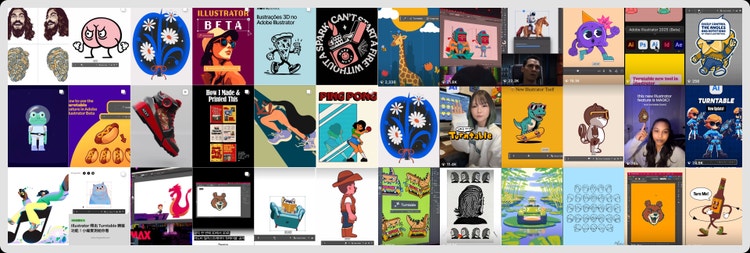
The numbers that stayed with us most weren't in a dashboard. They lived on social media, where artists proudly shared views of their characters. Around that same time, I co-hosted an Adobe Live session on Turntable and it’s still one of my fondest memories from the journey. Seeing community enthusiasm play out live confirmed the value of the feature and clarified what we needed to do next.
Phase 3. Experience upgrades
A second public beta of Turntable was announced and demoed at Adobe MAX LA 2025 by Illustrator evangelist, Michael Fuguso. This version focused on closing the gap between output quality and the user experience.
- Ease of access: Improving the discoverability of Turntable by addressing a discoverability gap we uncovered in Phase 2 and including it as a primary action in the on-canvas Context Task Bar.
- One-click value: Placing all 50 generated rotational views together on the canvas through a single action.
- Quality upgrades: Implementing and ensuring color consistency across rotated views.
Phase 4. Fine tuning the details that matter
This phase focused on integrating Turntable more deeply into Illustrator's constructs and delivering the most-requested features.
- Full rotation: Unlocking 180° linear rotation, which meant adding 24 more views to the original 50 and updating lower isometric-tilt up-and-down elevation angles to 30°.
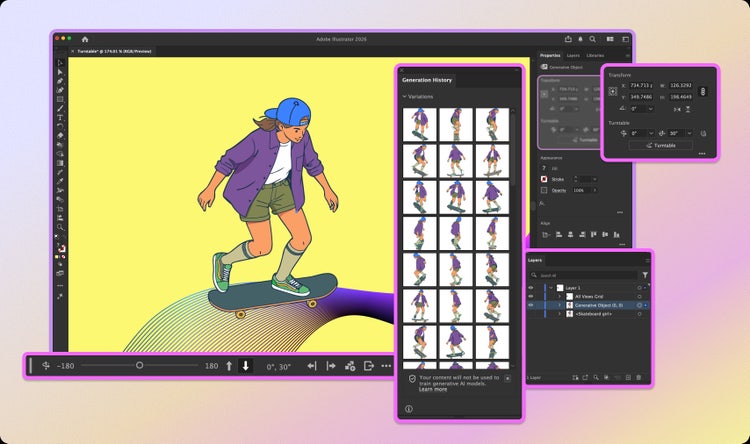
- Detailed constructs: Working through how generated objects would behave in the Layers, Properties, and Generation History panels. Questions like, “Will all views nest within one object?” and “How do we keep files from becoming heavy?” aren't glamorous, but getting them right is essential.
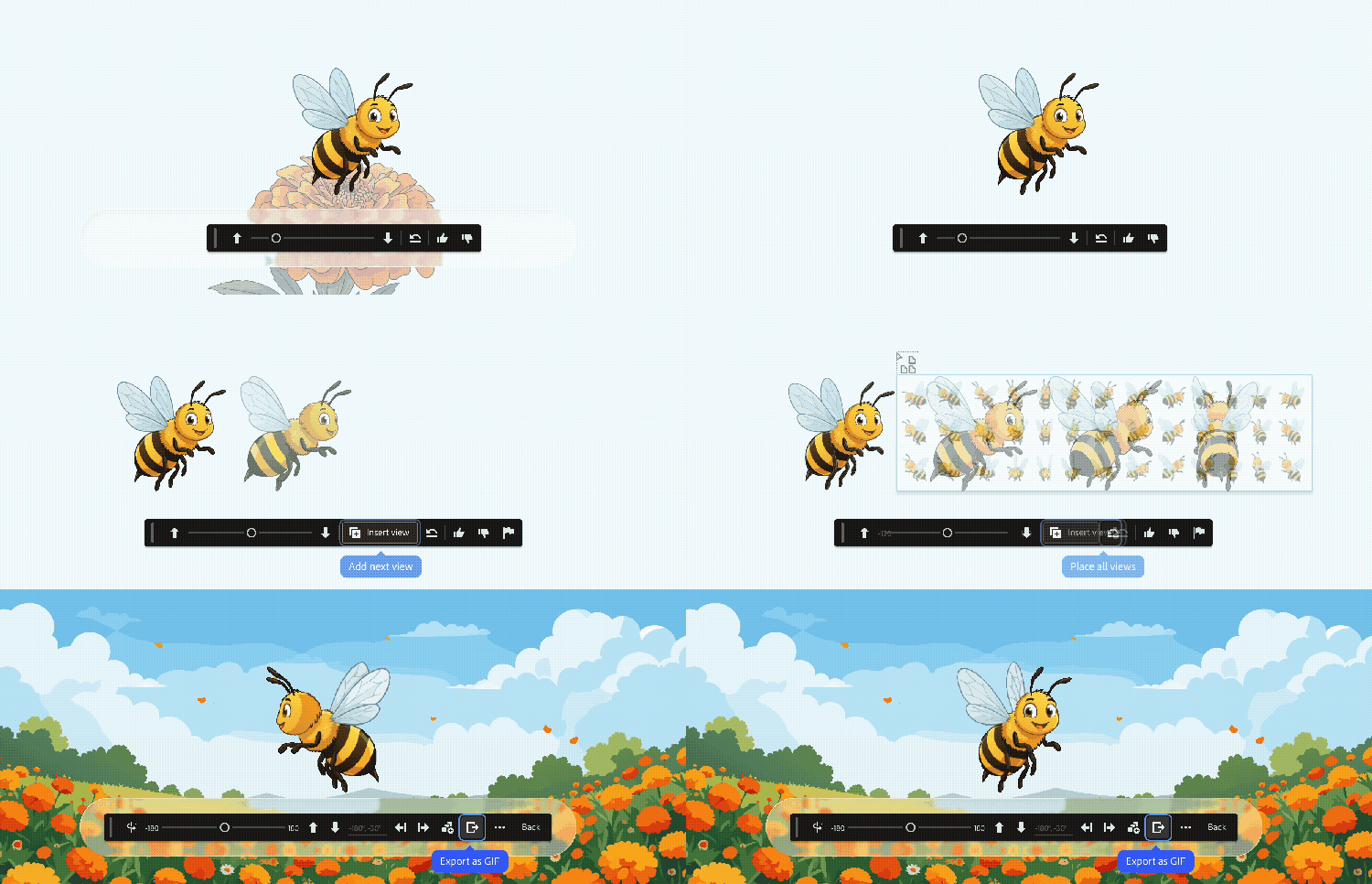
- Add-next view on canvas: Adding a button to the Contextual Task Bar button to create a smoother pan transition to the next rotated angle. It transformed the canvas into a flipbook of a character's full rotation, with each view landing next to the last and the whole arc visible at once (a small detail, but a delightful one).
Phase 5. Shipping with confidence
Because we had great engagement on social media throughout beta testing, we knew what we needed for a well-received v1.0 release to a general audience.
- GIF export: Users were already making videos of their rotating characters, so we formalized that process by adding the ability to export Illustrator content as a GIF from the Contextual Task Bar.
- Discovery and onboarding: We'd already built multiple ways for people to try Turntable—direct rotation, placing individual views, placing all views, reverting to original state—but we added a one-time guided user experience for people trying the feature on their own art for the first time along with a sample file so people could explore the feature without using generative credits.
What was the most unique aspect of the design process?
Taniya: Because we were so focused on the underlying technology, our early private beta testing began with a rudimentary UI. Illustrator is a powerful tool, and users are accustomed to complex settings and controls, but we hoped a simpler interface would work. From the start, we were guided by a set of design principles:
- Keep it simple: No unnecessary complexity
- Stay visible: Avoid flyouts and hidden settings
- Work for everyone: Make the experience intuitive for professional artists and beginners
- Protect artist input art: Ensure art is never altered, overridden, or lost when generating new views
One of our earliest explorations was a single slider and, surprisingly, it worked immediately. Users intuitively understood how to rotate using that one control with no X/Y fields, no 3D widget, and no complexity. That simple UI became the precursor to everything that followed: The controls that made it into the final product didn't come from what was technically possible; they came from what made sense and what users asked for.
The design process was more like the engineering process—less end-to-end and more incremental phase-to-phase. Each phase was treated as a learning cycle where we absorbed what we saw in an earlier phase, then expanded it. Because we’d gathered so much information early on, we were able to avoid the design-test-design cycles that can accompany this type of work. That significantly reduced work cycles and ultimately became a great case study for how product management, engineering, design, and the user community could collaborate to shape future generative AI features.
What was the biggest design hurdle?
Taniya: As a designer, working on generative AI-powered features always comes with a fundamental tension: mapping the promise of the feature to what the model can achieve at that moment in time, while ensuring users best interests are met. Generative AI is fluid by nature—outputs aren't fixed and aligning them with a user's creative intent requires continuous calibration. Designing that kind of subjective precision means staying close to users throughout, not just at the start and end, so goals remain realistic and achievable.
How did the solution improve the in-product experience?
Taniya: We designed a set of experience patterns that can now scale to future generative interactions inside Illustrator:
- Instead of relying on text prompts or setup, Turntable treats the artwork as the input and delivers value from a single selection with no configuration required.
- By consolidating all Turntable actions into the Contextual Task Bar and aligning the interaction with the underlying technology, we reduced the need for extensive onboarding.
- Subtle details like smoother panning, sequential view placement, and a canvas that responds to the work, add moments of delight to the experience.
What did you learn from this design process?
Taniya: Applying generative AI to vector art has always been a challenge but by holding the line on both output quality and interaction simplicity we were able to design a feature works because it doesn't ask the artist to change how they think. It meets them where they are, in the visual at the heart of their craft, and extends what's possible from there. From the start it felt like the right use of generative AI... and it still does.
What’s next?
Taniya: Turntable taught us something important: When AI understands the visual language of the work—the intent and logic embedded in it—the experience stops feeling like a “feature” and instead feels like a natural extension of how artists already think.
As generative technology and user needs evolve, Illustrator will too. We’ll continue to use AI agents to support Illustrator users by automating time-consuming tasks (renaming layers, cleaning up and organizing files, applying bulk edits, exports, and conducting find-and-replace for any asset in a file) using AI agents.