Behind the design: Assisted Culling in Adobe Lightroom
Teaching AI to make technical calls so photographers can focus on creative decisions
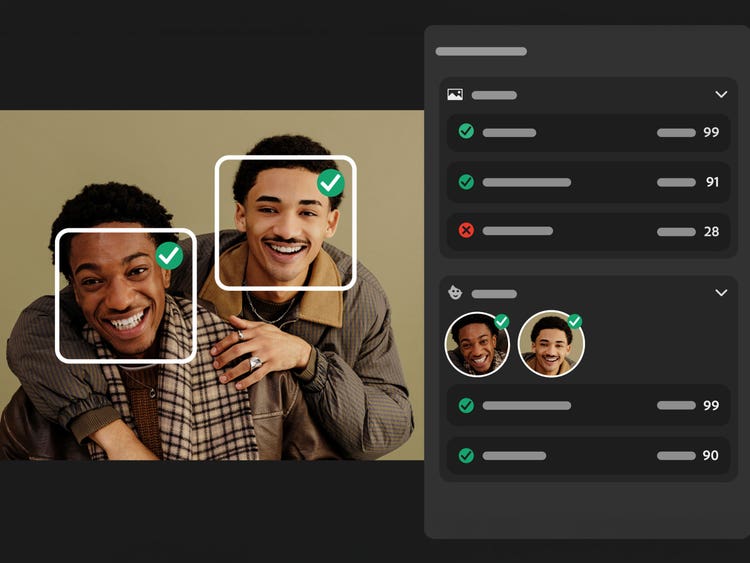
Despite years of advances in cameras and editing tools, this part of the workflow has barely changed: Photographers are still manually deleting misfires, judging focus and expression by zooming in, and narrowing every burst down to a single keeper (a photography term for a photo worth saving) all by hand.
Assisted Culling, available in Adobe Lightroom and Lightroom Classic, was built to take the first pass at identifying those keepers. Senior Engineers Shipali Shetty and Ankur Murarka, Product Manager Kwamina Arthur, and Senior Product Designer Christopher Sun walk through why the team built the feature, the principles that shaped it, and how photographer feedback has improved it since its beta launch at Adobe MAX in 2025.
What was the primary goal when you set out to build Assisted Culling?
Shipali Shetty: It started with a request we heard again and again: “After a shoot, I spend hours picking the best photos. I need a better way to quickly find my best shots.” This showed up in surveys, prerelease forums, and customer feedback. At Adobe MAX 2024, it rose to the top of our feature request board by a wide margin.
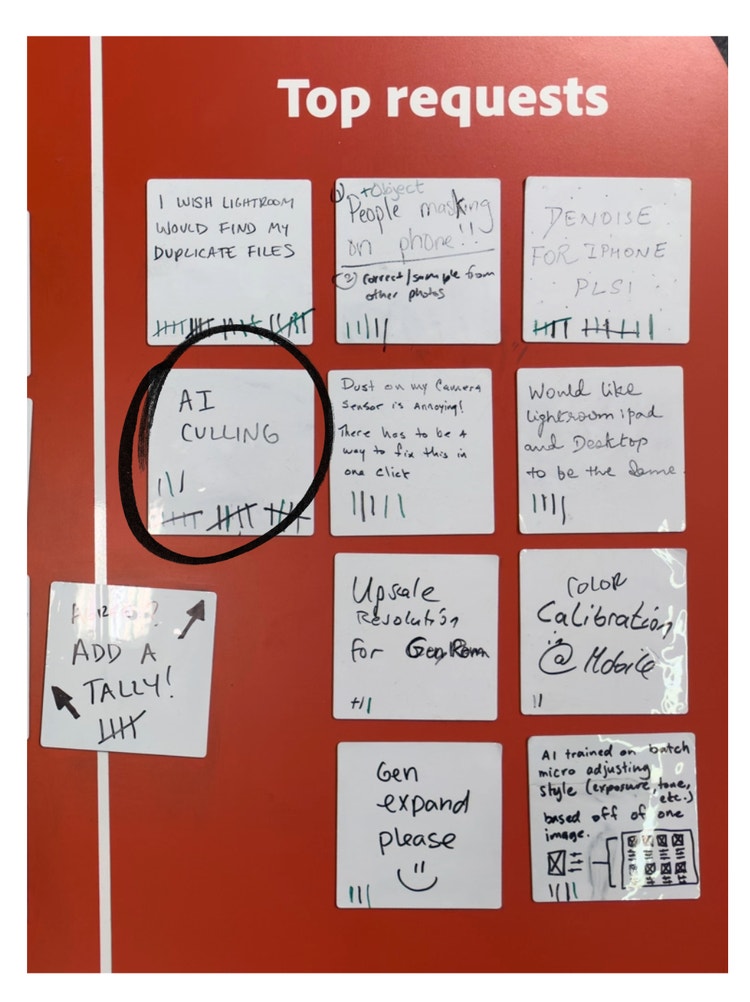
The more time we spent speaking with photographers, the clearer it became that the real bottleneck wasn't scrolling or zooming in on each image to find the best option. It was the second-guessing. A wedding might produce dozens of near-identical frames of the same kiss. The hard part isn't moving through them quickly; it's having the confidence to commit to one. Our goal became narrower and harder than "speed up culling.” We needed to build something that helped photographers make the tough calls with less doubt.
What principles guided the design?
Christopher Sun: We reviewed professional photographers’ workflows, and their processes pushed us toward five core design principles:
- Evaluate each quality signal independently. Photographers don't judge images with a single score; they evaluate focus, eyes, expression, and technical failures separately. Instead of a single “rate this photo” black box, the system surfaces a separate score for each quality signal, so photographers can see exactly why an image passed or failed.
- Prioritize technical judgment; keep subjective judgment flexible. A child's funny face might be a reject to one photographer and a keeper to another because of what the moment represents. We wanted the system to own the technical analysis but leave the subjective calls to the photographer.
- Assist, don't decide. Our conversations with photographers made clear they wanted to offload technical analysis, not authority. That's why the feature is named “Assisted Culling,” and is built around sliders, thresholds, and filters instead of automatic decisions—control stays in the photographer’s hands.
- When in doubt, keep it. Not every mistake costs the same. We tuned the system to optimize for high recall on keepers, which is why reject decisions are deliberately conservative. A frame must clearly fail before it's set aside.
- Make it fast, local, and seamlessly integrated. Waiting for thousands of images to upload can break the creative flow, so Assisted Culling runs on-device and within the current set, without forcing photographers into a separate workflow.
What was the most unique aspect of the design approach?
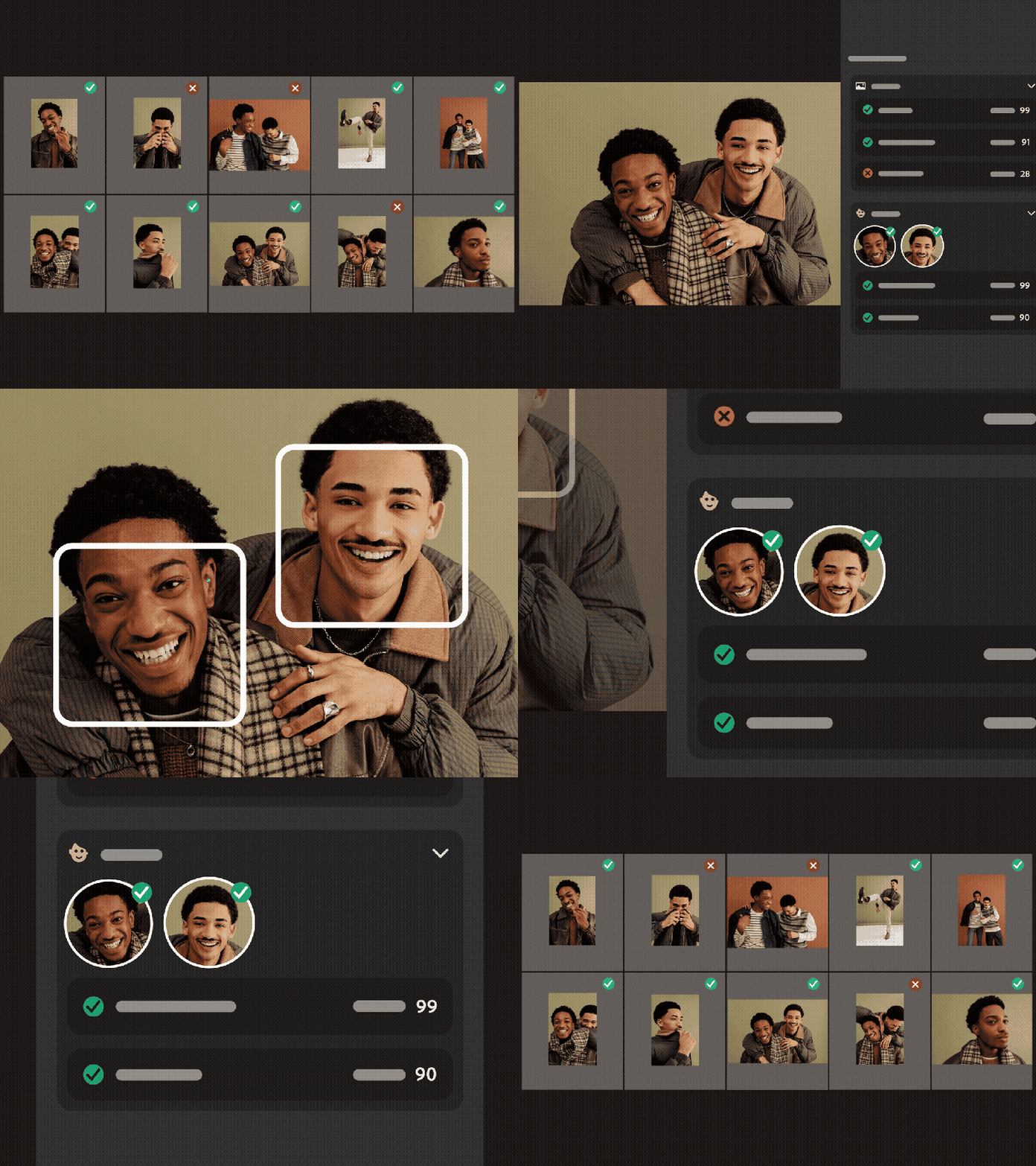
Ankur Murarka and Shipali Shetty: Assisted Culling isn't one model; it's a set of specialized machine learning models, each focused on a single task, unified by an orchestration layer. Instead of running each model independently, the models share intermediate results, a single rendered image, a shared blur map, and a common semantic representation. Each stage builds on the last to make the system faster and more consistent while still allowing each model to do one thing well.
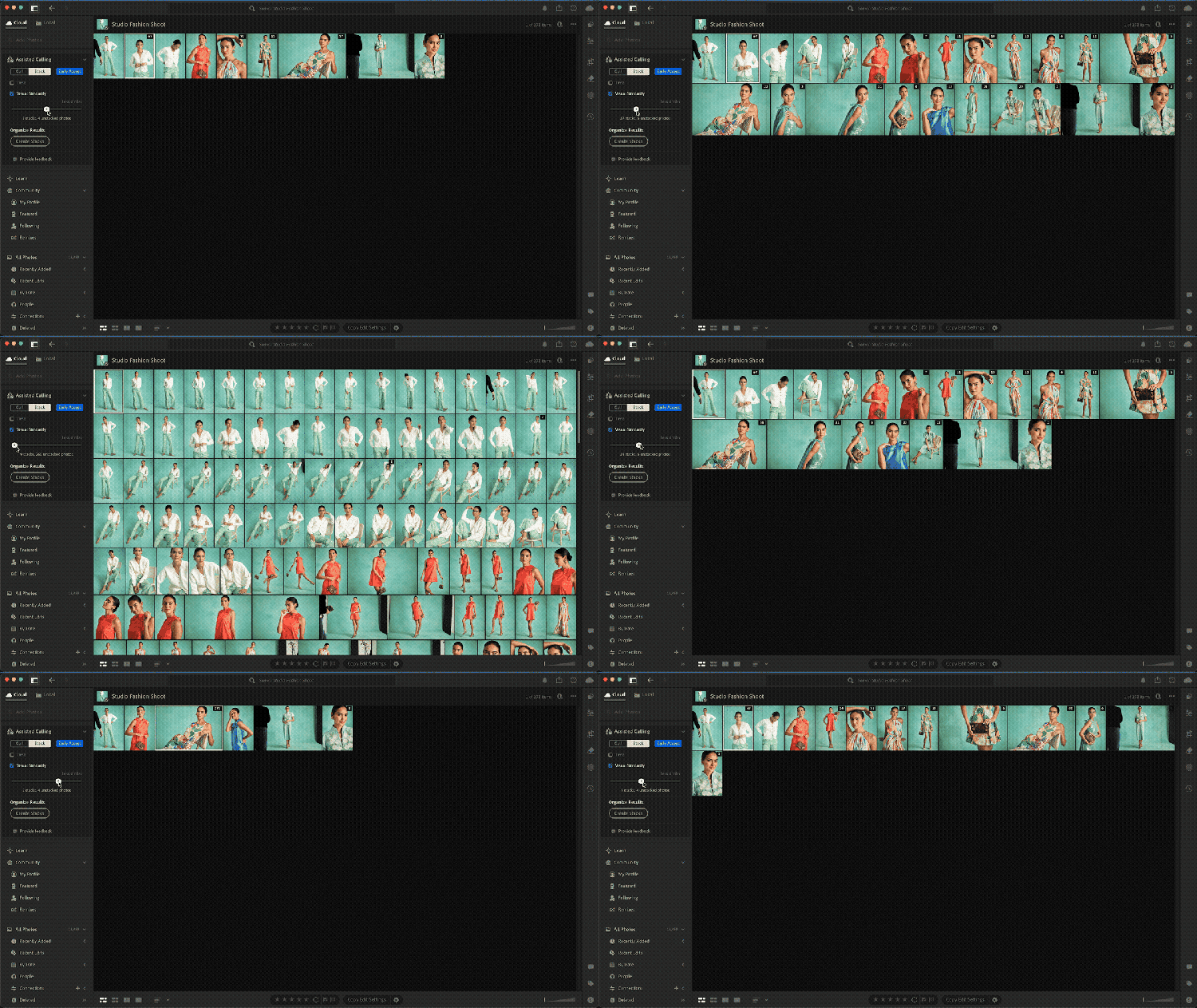
That orchestration plays out as three capability pairs: Subject & Eye Sharpness, Eyes Open & Face View, and Stacking & Aesthetic Ranking.
Subject & Eye Sharpness
Subject Sharpness looks at the main subject's focus level in context, not just pixel-level blur. It combines blur distribution, whether that blur reads as intentional, where the subject sits in the frame, and overall aesthetics into a single score that reflects how sharp the subject actually looks rather than a binary in-focus check.
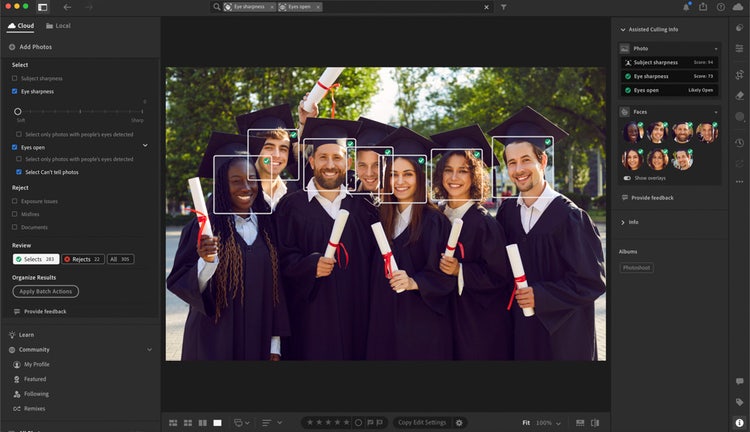
Eye Sharpness goes a level deeper. Each eye is scored independently, then aggregated at the face and image level. This matters most for portraits and group shots where a single out-of-focus eye shouldn't tank a whole image.
Eyes Open & Face View
Like Eye Sharpness, Eyes Open evaluates each face independently for open, closed, or partially occluded eyes; it combines those assessments across the frame, so a group shot isn't penalized because of one ambiguous detection. When the model genuinely can't decide, because of sunglasses or shadow, motion, it’s surfaced as "Can't tell" rather than defaulting to closed, so the photographer has final say.
Face View, displayed in a panel alongside Loupe View, surfaces eye sharpness and eyes open scores for each detected face in an image. Rather than zooming in to every frame in a burst, photographers can scan faces at a glance to see exactly which subjects have sharp eyes and which eyes are open.
Stacking & Aesthetic Ranking
Finally, we included Stack, a tool that helps manage volume associated with photoshoots. In addition to, or instead of, culling, photographers can stack images by capture time, useful for bracketed exposures, or by visual similarity, for bursts. When stacking by similarity, frames aren't just grouped; Aesthetic Ranking automatically surfaces the strongest image as the first in the stack—evaluated on composition, lighting, and expression—so photographers see their best option first without having to dig through ten near-identical shots. And, like everything else, it's adjustable: change the threshold, update the groupings, or override the leader if the model gets it wrong.
How did customer feedback improve the feature?
Ankur Murarka and Shipali Shetty: We launched the beta at MAX 2025 with a deliberately narrow scope on portraits and headshots and asked the community to push it under real conditions. Photographers using it on live shoots at scale surfaced behaviors and edge cases that internal testing couldn't fully capture. Feedback came through two channels: in-app feedback dialogs built into the Assisted Culling panel and the community forums. Together, they helped us prioritize the most critical gaps. That input surfaced three areas that needed focused work: shallow depth-of-field, inconsistent face detection in larger groups, and finer control over reject decisions.
Portrait and wedding photographers flagged that shallow depth-of-field shots were sometimes marked as out-of-focus rejects. We updated the subject focus models to distinguish intentional blur, motion blur, and missed focus, so a sharp subject against a soft background is no longer scored the same as a genuinely out-of-focus frame.
Event and wedding photographers pointed to inconsistent face detection in larger groups that included missed faces, merged detections, and unreliable eye-state scores. We built a dedicated face detection model with confidence scoring, that filters out lower-confidence detections before scoring even happens, so what a photographer sees for eye focus and eye state reflects the actual subjects in frame. We also improved Eyes Open detection specifically for smaller and slightly soft faces in bigger groups, and for turned heads, profiles, and partial occlusion.

Earlier versions of Assisted Culling used a single classifier for rejecting categories, which photographers correctly identified as too coarse—a portrait shooter, and a documentary shooter don't define a "reject" the same way. We split exposure, misfires, and documents into independent signals, each with its own control, including a slider for exposure threshold instead of a fixed standard.
What was the biggest design hurdle?
Kwamina Arthur and Shipali Shetty: Trust. If the system is wrong in a way that costs a photographer a keeper, that's not a UX problem, it's a business problem. The asymmetry principle, “when in doubt keep it,” sounds simple, but it meant accepting a system that's deliberately imperfect in one direction. We had to be comfortable shipping something that occasionally hands a photographer one extra frame to dismiss, in exchange for never being the reason a real keeper got thrown out.
On the engineering side, training on large, diverse datasets of licensed images wasn't enough on its own. Raw data doesn't teach a model how photographers actually make decisions as they cull. To bridge that gap, we worked directly with photographers to validate model output against curated truths from actual professional workflows. We then used user studies and beta feedback to identify failure cases and refine the system for edge cases like intentional occlusion, group dynamics, and creative choices such as shallow depth of field. Rather than chasing a single accuracy metric, we optimized for consistency and trust, reducing obvious errors without requiring photographers to double-check every decision.
What's next?
Kwamina Arthur: The move from beta to general availability came directly from photographer feedback, and that loop won’t stop. We're expanding scene understanding beyond portraits, weddings, and events; adding richer signals like expression and scene-aware composition; tackling challenging cases like distinguishing motion blur from intentional softness in landscapes and action shots; and improving visibility into how the system ranks images within a Stack, not just at the top. Beyond these technical improvements, we’re refining the user experience to make Assisted Culling a more seamless part of the workflow and help photographers find their best images faster.

Like everything in Lightroom, Assisted Culling is fully non-destructive, so there's nothing to lose while testing it against images from a photoshoot. And if it gets something wrong because of lighting conditions or shooting style, people can share feedback either directly from the Assisted Culling panel or through the Lightroom and Lightroom Classic Adobe HelpX community forums. That feedback will help shape the next version of the feature.
Big thanks to the Assisted Culling team, the Lightroom community members who shared feedback, and everyone else who contributed to the feature.