You can't describe your way to great design
Great creative work needs a canvas, not a conversation
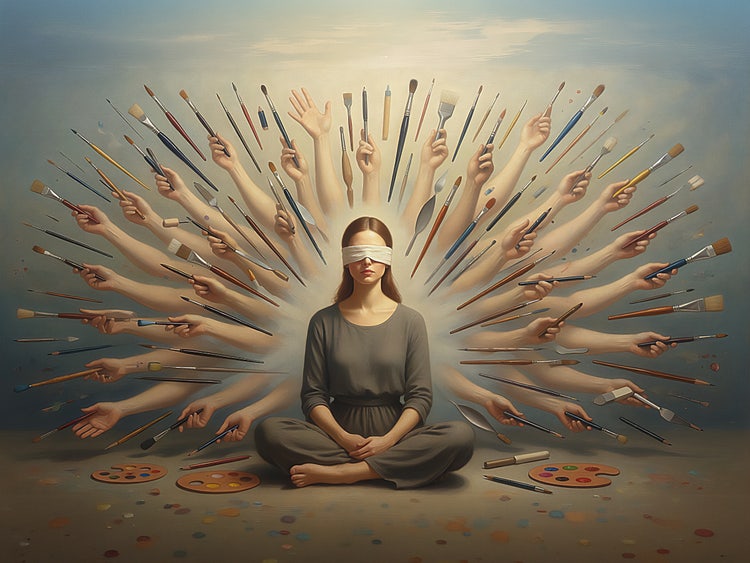
We've dressed this up as a new way to create, but it's really just a slower version of giving feedback to someone who isn't in the room. The work worth doing, the kind that requires feeling, instinct, and a hundred small experiments, can't survive that loop.
I’ve spent fifteen years designing creative tools at Adobe, most recently leading design for AI-powered creative workflows, and I've come to believe that the tools we're building right now fundamentally misunderstand what creative professionals actually need.
AI powered creative tools in the market today
Look at what’s in the market today, and you find two shapes of creative tools, built for two very different problems.
First is the editable-but-constrained tool. These include Lovable, Figma Make, and even Claude’s new design capabilities. They produce clean, on-brand compositions with layers you can touch, inside guardrails that keep the output safe. They work beautifully for teams that need a usable asset but aren’t looking for creative control—a marketer making a webinar card, a product manager needing a slide graphic, a solopreneur creating a brand for their business. The tool does the job. Nobody pretends it’s producing a boundary-pushing piece of work. For better or for worse, this type of content will become a standard.
Second is the expressive-but-uneditable tool. These include Flux, Nano Banana, Adobe Firefly, and their peers. These can genuinely surprise you. The output has range, atmosphere, and ambition. But the interaction is a conversation—you describe, generate, describe again, regenerate—but once you land on something you like, the composition is sealed.
And that matters, because the most interesting creative work happens through process and not through output alone. A creative director working on a campaign image isn’t just placing objects in a frame: They’re pulling a soft light blend mode over a texture layer to see if it adds grit; dropping a color grading adjustment to push the whole thing cooler; or duplicating a layer, desaturating it, setting it to luminosity at 40% to see what happens to the contrast. None of those moves is planned. They’re discovered. Creative work is chasing a feeling through a hundred small experiments until something clicks.
You can’t do that through a conversation. By the time you’ve described “a soft light blend mode at 60% opacity over a crumpled paper texture, on top of a desaturated portrait, with a vignette pulling in from the edges,” you’ll have lost the impulse. The move must happen in a hearbeat, or it won’t happen at all.
A lot of people think “instruct to edit” (whereby, instead of generating from a blank prompt, you point at a layer and tell the AI what to change) solves this because it sounds like control. But it isn’t, it’s the beginning of another conversation. You’re still translating spatial, intuitive decisions into language, waiting for a response, evaluating the result, then translating again. The loop is just slower and more polite. Instruction-based editing doesn’t restore the feedback loop between hand, eye, and intuition; it just puts a friendlier face on the bottleneck. That’s not a creative tool. That’s a command line with better marketing.
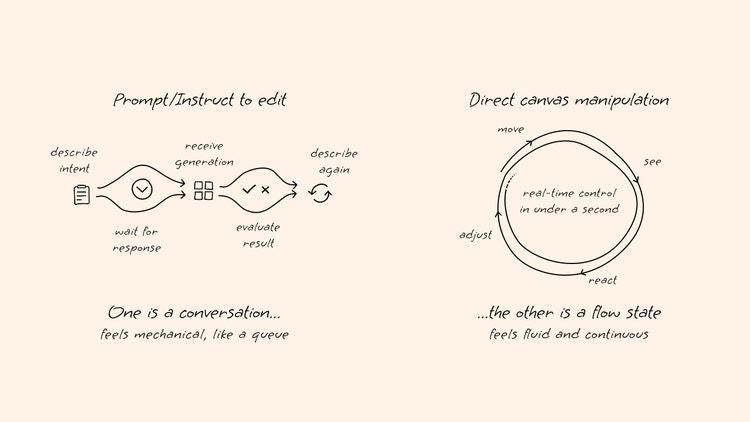
The ideal tool would naturally be expressive and editable. Like Cursor, but for creatives. The reason nobody’s built this yet is that creative files have no syntax. A codebase has grammar; AI can parse it, trace dependencies, and make targeted changes with confidence. But a layered Adobe Photoshop document has elements that are spatial, relational, and full of meaning that isn’t written anywhere. “Multiply layer at 12% opacity” isn’t labeled “mood,” but that’s what’s being added, and you can’t instruct your way to that—a tool must understand it.
What serious teams are already doing
You can see the shape of missing tools most clearly by looking at what creative-forward teams are doing to work around their absence.
Walk into the AI practice at a creative agency right now, and you won't see anything that looks like a prompt box. You’ll find designers wiring elaborate ComfyUI graphs—with nodes for segmentation, relighting, style transfer, and compositing—and chaining them together into creative pipelines. Then, because the designer who built the graph can’t easily reproduce it at scale, a technologist will turn it into a repeatable workflow. Entire courses have sprung up to teach designers how to become part-engineers, so they can build these pipelines because no one has shipped the tool they need.
When sophisticated creative teams are stitching together node graphs and hiring technologists to operationalize them, the market is signaling an unmet need: Clients expect AI-accelerated output, but off-the-shelf tools can either give deliverable but safe compositions or expressive-but-sealed images, neither of which scales into a campaign. So, they build the missing layer themselves, painfully, one node at a time.
A functioning tool would collapse that entire workaround into a single solution: the node graph hidden behind a canvas, and the technologist replaced by an AI assistant that watches what the designer is doing and responds in kind. Until that exists, the workaround is the product, and it’s expensive, fragile, and limited to the teams that can afford to build it.
What the right tool actually looks like
The tool that closes this gap won’t be a better prompt box, and it won’t be a smarter instruction parser. It will be a canvas where a designer can work directly with layers, spatial relationships, and compositional choices, and the AI will be ambient—present at the edge of the work, watching what’s happening, and responding to a gesture rather than a sentence.
AI’s role in that environment won’t be to drive the composition or wait to be addressed. It will be to sit alongside the work, handle masking, generate options within a constrained region, and quietly prepare the next three moves the designer is likely to make, so the designer can stay in flow and never has to leave the canvas to type a sentence.
What survives
When DSLR cameras got cheap, and smartphones put “good enough” cameras in everyone else’s pockets, the middle tier of commercial photography collapsed. Overnight, the photographer you hired for routine headshots or product shots became optional. But the top photographers stayed exactly where they were. Because their value was tied to their compositions, their lighting techniques, and their ability to capture moments, no number of megapixels could replace their craft.
That same compression is coming for creative work. Companies that now need ten creatives will soon need only two or three. Those who remain will be directors who set intent, make taste calls, and shape work rather than produce every pixel. That’s not a smaller role. It is a more demanding one.
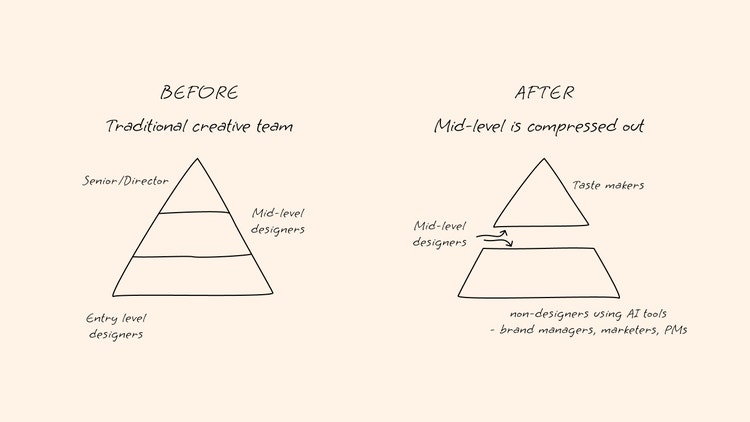
And, for better or worse, just like anyone with an iPhone became a “photographer,” anyone with access to creative AI tools will become a “designer”—brand managers will generate their own assets, marketers will skip the agency, and product teams will prototype visuals without filing a design request.
That wave is already breaking; the question is whether it will produce great work or just speed up mediocrity. What happens when all content starts looking the same? How will creatives push boundaries? The answer to that will depend on the quality of their tools: A prompt box will always produce output, but a canvas, one that gives creative professionals real control and newcomers a way to develop real intuition, produces work worth looking at.